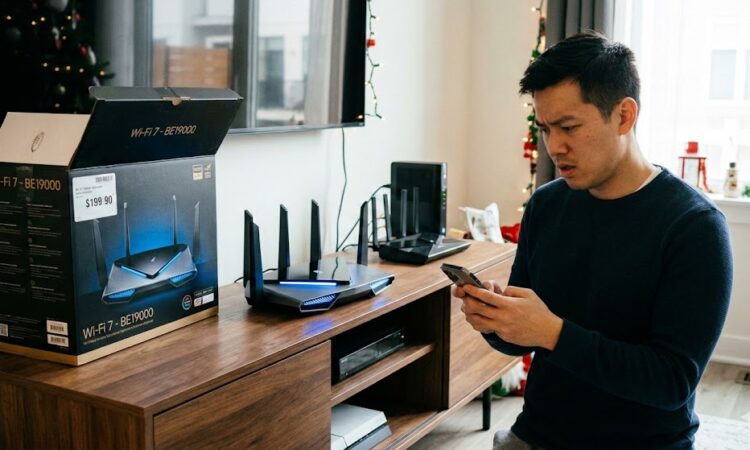
It is December 2025. The holiday lights are blinking, the shopping rush is in full swing, and if you have walked into an electronics store recently, you have probably seen the massive boxes for “Wi-Fi 7” routers. They look like alien spaceships, they cost as much as a mid-range laptop, and they promise speeds that sound scientifically impossible.
But let’s pause for a second. Do you actually need Wi-Fi 7 right now? Is it going to change your life, or is it just another way to spend $500 to scroll through social media at the exact same speed?
Let’s break down exactly what Wi-Fi 7 is, how it works, and whether you should put it on your wish list or wait for the prices to drop in 2026.
What Exactly is Wi-Fi 7?
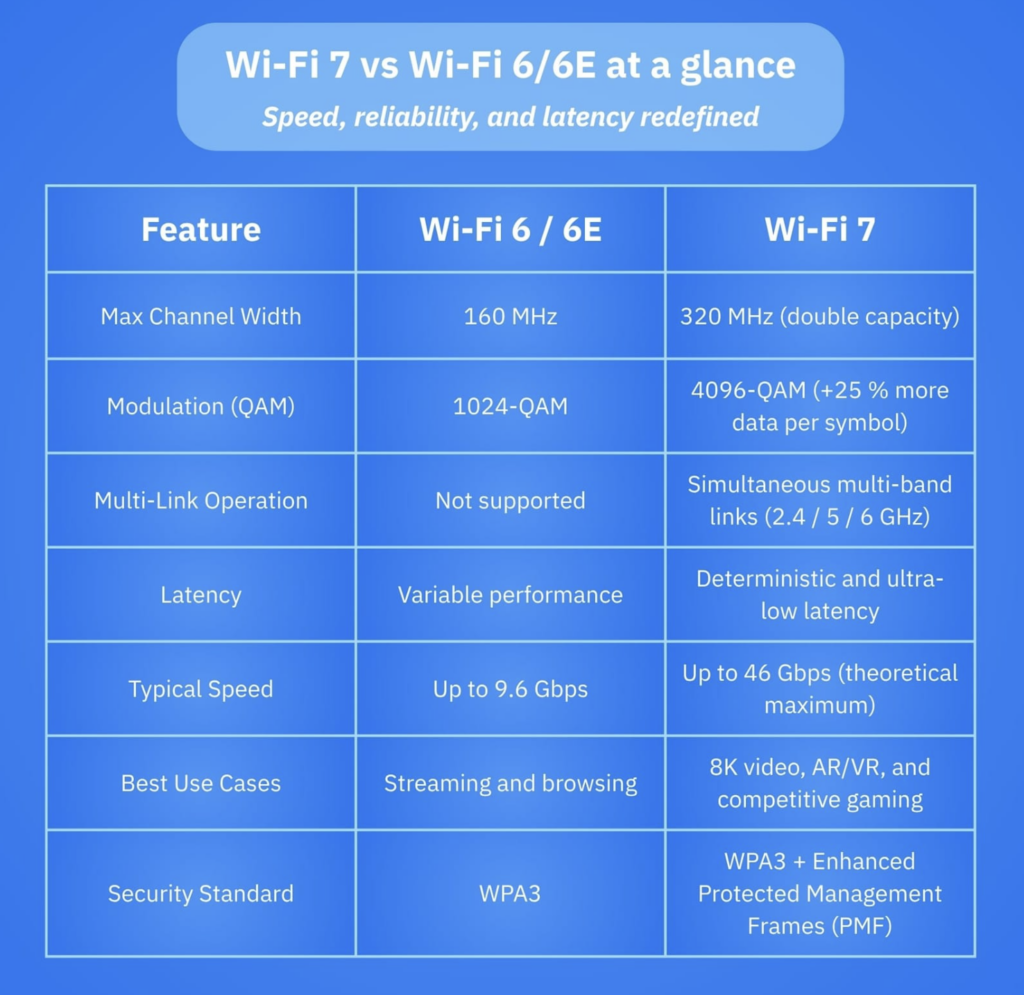
Technically known as 802.11be, Wi-Fi 7 is the successor to Wi-Fi 6E. While Wi-Fi 6 was all about handling more devices, and Wi-Fi 6E was about opening up a new “VIP lane” (the 6 GHz band), Wi-Fi 7 is focused on something we all desperately want: consistency and ultra-low latency.
Marketing materials will scream about “46 Gbps theoretical speeds,” but let’s be real: you are not going to get 46 Gbps. You probably do not even have a 46 Gbps internet plan – most of us are lucky to have 1 or 2 Gbps fiber. The real magic of Wi-Fi 7 isn’t just raw speed; it is about how smarter it is at managing the airwaves.
Think of your current Wi-Fi like a delivery driver who can only use one road at a time. If the highway (5 GHz) is jammed, they are stuck. If the side street (2.4 GHz) is clear, they have to exit the highway and switch over, which takes time. Wi-Fi 7 changes the rules of the road entirely.
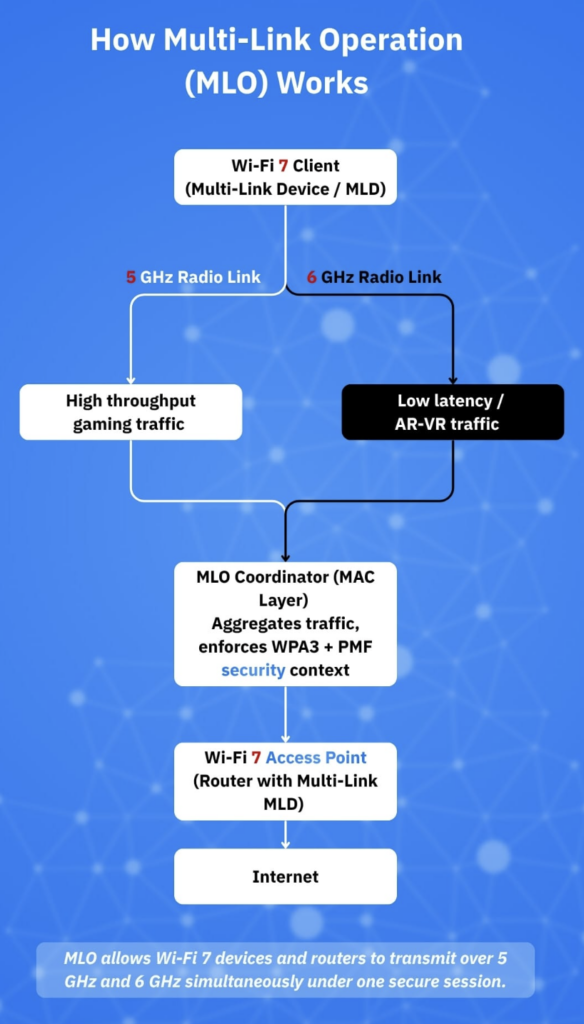
The Killer Feature: Multi-Link Operation (MLO)
If you only remember one acronym from this article, make it MLO. It stands for Multi-Link Operation, and it is the single biggest reason Wi-Fi 7 exists.
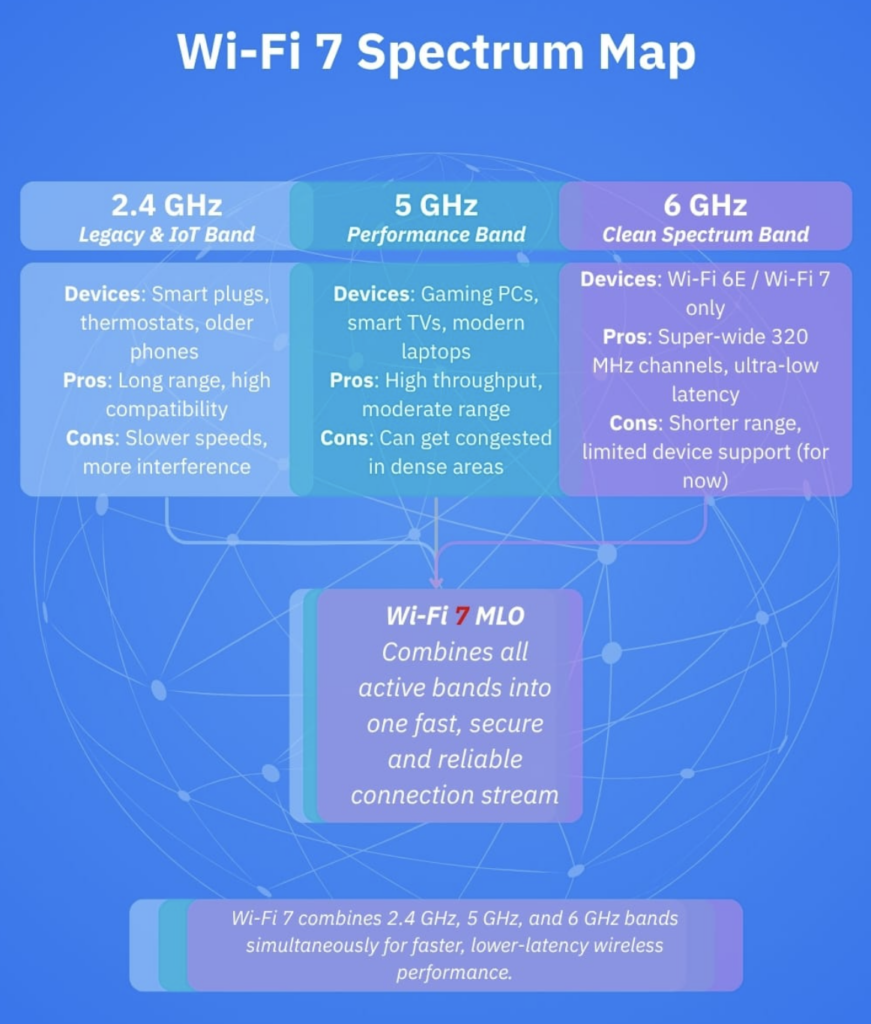
In the past (even with Wi-Fi 6E), your phone connected to your router on a single band – either 2.4 GHz, 5 GHz, or 6 GHz. It picked one and stuck with it until the signal got so bad it was forced to switch. MLO allows a Wi-Fi 7 device to connect to multiple bands simultaneously.
Imagine a three-lane highway where your car can drive in the fast lane, the middle lane, and the slow lane at the same time. If a big truck (interference) blocks the fast lane, your data packets just instantly flow around it in the other lanes without you ever noticing a stutter.
This creates three massive benefits:
- Zero Switching Delay: You don’t drop the connection when moving from the living room to the bedroom.
- Throughput Aggregation: You can combine the speeds of the 5 GHz and 6 GHz bands to download files faster.
- Reliability: If your neighbor’s microwave kills the 2.4 GHz band, your movie keeps streaming perfectly on the 5 GHz and 6 GHz bands without buffering.
The “Wider Pipe”: 320 MHz Channels
The second big upgrade is the channel width. Wi-Fi works by sending data over radio channels. The wider the channel, the more data can pass through at once.
- Wi-Fi 5: 80 MHz channels
- Wi-Fi 6/6E: 160 MHz channels
- Wi-Fi 7: 320 MHz channels
Going from 160 MHz to 320 MHz is literally doubling the size of the pipe. This is only possible on the 6 GHz band (because the older bands are too crowded), but it means that if you are in the same room as your router, you can move massive amounts of data instantly. This is why you see those wild speed claims on the box.
If you are a video editor transferring terabytes of footage wirelessly to a NAS (Network Attached Storage), or if you are trying to stream uncompressed 8K video to a headset, this 320 MHz width is a game-changer. For checking email? It is overkill.
The Reality Check: The Hardware Problem
Here is the cold water bucket for your excitement. To use Wi-Fi 7, you need two things: a Wi-Fi 7 router and a Wi-Fi 7 device. As of December 2025, the list of compatible clients is growing, but it is still exclusive. You likely have Wi-Fi 7 if you own:
- Smartphones: iPhone 16 or 17 series, Samsung Galaxy S25 series, Google Pixel 9 or 10.
- Computers: A laptop with an Intel Core Ultra (Series 2) chip or a Snapdragon X Elite processor.
- Consoles: The mid-cycle “Pro” refreshes of current-gen consoles (if you managed to snag one).
If your laptop is from 2022 or your phone is an iPhone 14, buying a $500 Wi-Fi 7 router will not make your web browsing any faster. Your old devices will still connect, but they will communicate using the older Wi-Fi 6 or 5 standards. The router will be a Ferrari, but your phone will still be driving like a Honda Civic.
Speed vs. Latency: Why Gamers Should Care
If you are a gamer, you know that “ping” (latency) is more important than raw download speed. This is where Wi-Fi 7 actually shines for real-world usage.
Because of MLO, Wi-Fi 7 can reduce latency by up to 80% compared to Wi-Fi 6. By keeping multiple connections open, the router doesn’t have to “wait” for a clear opening in the airwaves to send a packet; it just sends it down whichever lane is open right now.
For competitive gaming, this brings wireless performance dangerously close to Ethernet cable levels. If you simply cannot run a cable across your house because your landlord (or spouse) forbids it, Wi-Fi 7 is the first wireless standard that might actually be “good enough” for high-stakes ranked matches.
The Price of Admission (Late 2025 Edition)
So, what is the damage?
In early 2024, Wi-Fi 7 routers were absurdly expensive – often touching the $800 mark. Now, at the end of 2025, prices have cooled, but they are still premium.
- Entry-Level Wi-Fi 7 Routers: You can find budget models from brands like TP-Link or Linksys for around $200–$250. These usually cut corners on the number of antennas or the processor speed.
- High-End Mesh Systems: A robust 3-pack mesh system (like Eero Max 7 or Netgear Orbi 970) that covers a large home will still set you back anywhere from $1,200 to $1,800.
Compare this to a very capable Wi-Fi 6E mesh system, which you can now grab for under $300 on holiday sales. That is a massive price difference for a feature set that requires brand-new phones and laptops to even utilize.
The Verdict: Do You Upgrade?
Let’s simplify this decision. Read the following profiles and see which one fits you.
Profile A: The Early Adopter / Heavy User
- You have a house full of smart home gadgets (50+ devices). You have a Gigabit fiber connection. You own a Galaxy S25 Ultra or an iPhone 17 Pro. You maybe even have a VR headset like the Apple Vision Pro or Meta Quest.
Verdict: Yes, upgrade. The MLO feature will help manage the interference from all your smart bulbs and cameras, and the low latency will make VR wireless streaming buttery smooth.
Profile B: The Gamer in a Rental
- You game competitively, but you cannot drill holes in the wall for Ethernet cables. You live in an apartment complex where the Wi-Fi airwaves are crowded with your neighbors’ signals.
Verdict: Consider it. If you have a compatible PC or console, the interference-busting capabilities of Wi-Fi 7 could stabilize your ping. But a long Ethernet cable taped along the baseboard is still cheaper and better.
Profile C: The Average Household
- You stream 4K Netflix, scroll TikTok, and do Zoom calls for work. Your current router is a Wi-Fi 6 model provided by your ISP or one you bought 3 years ago. You don’t know what “latency” really feels like.
Verdict: No. Save your money. Wi-Fi 7 offers almost zero tangible benefit for basic streaming and browsing compared to Wi-Fi 6. The bottlenecks in your experience are likely your ISP speed or the server you are connecting to, not your local Wi-Fi bandwidth.
Troubleshooting Before You Buy
Before you rush out to spend hundreds of dollars, try these free fixes to improve your current network. Often, “slow Wi-Fi” is just “bad placement.”
- Elevate the Router: If your router is on the floor or hidden inside a TV cabinet, you are killing the signal. Radio waves hate metal and concrete. Put it high up on a shelf.
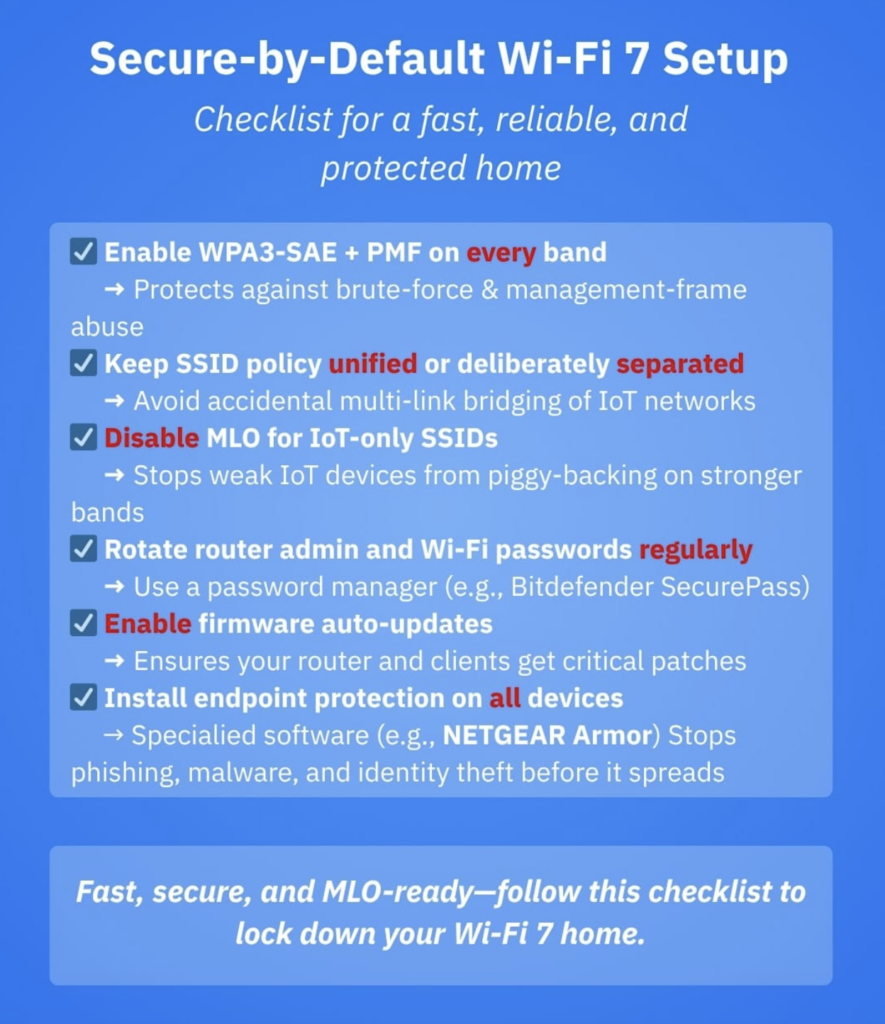
- Separate the Bands: If your router allows it, separate your 2.4 GHz and 5 GHz networks. Force your TV and laptop onto the 5 GHz network to ensure they aren’t getting stuck on the slower, crowded 2.4 GHz band.
- Check the Channel Width: Log into your router settings and see if your 5 GHz band is set to 20 MHz or 40 MHz. Try bumping it to 80 MHz (or 160 MHz if available) to instantly double your potential speed.
Final Thoughts
Wi-Fi 7 is an incredible piece of engineering. The ability to use multiple bands at once (MLO) is the “flying car” moment for wireless networking. By 2027, this will be the standard in every cheap router provided by cable companies.
But right now, in December 2025, it is a luxury tax. Unless you have the specific high-end devices to match it and a specific need for ultra-low latency, you can safely skip this generation or wait until the prices drop further next year.
Enjoy your holiday tech shopping, and remember: a $500 router won’t make you better at Call of Duty, but practice might.